




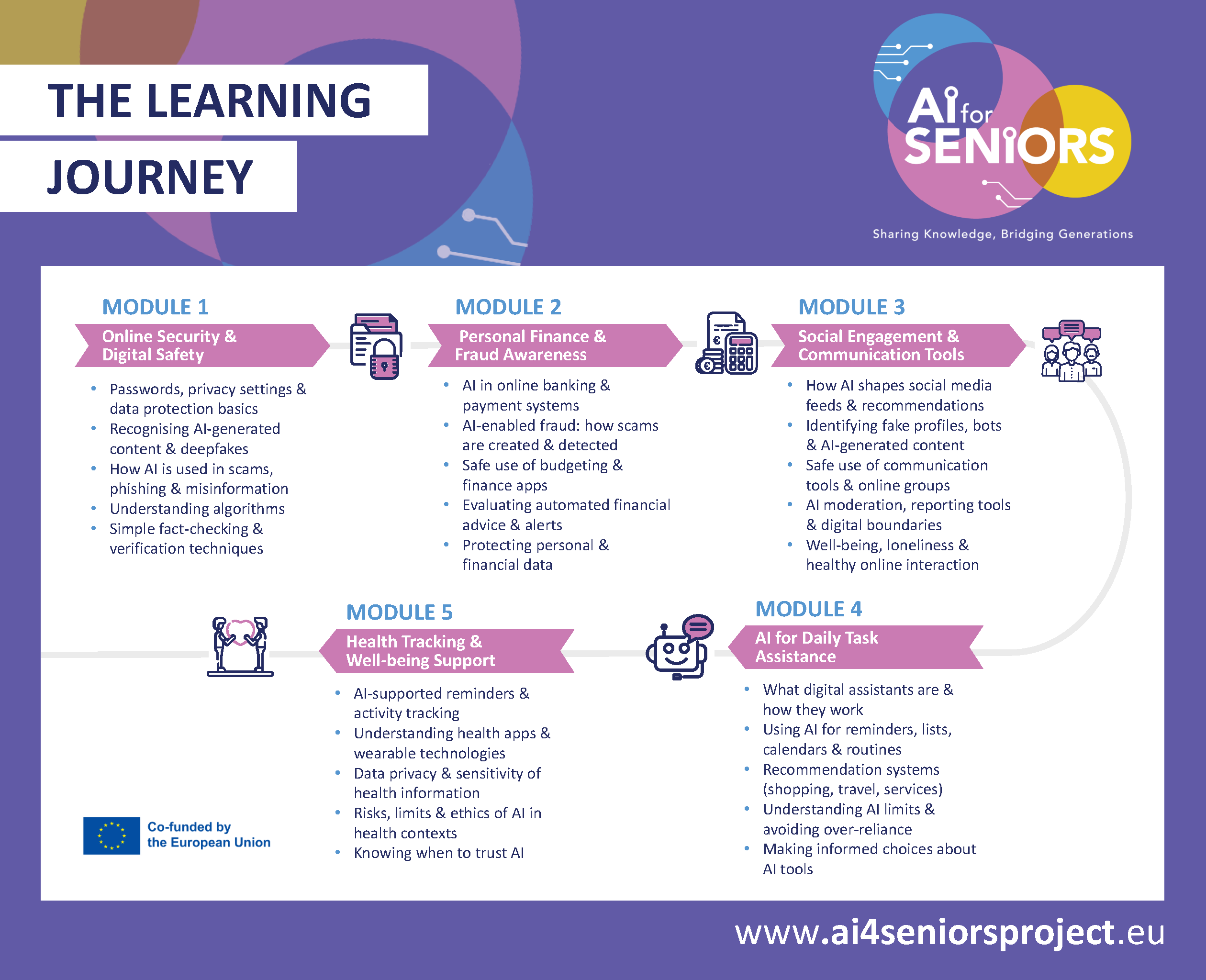
At the heart of the training is a guided tutorial series, organised into five clear modules. Each module focuses on practical, real-life digital skills that help seniors stay safe, informed and connected online.
The modules include:
These tutorials form the main teaching pathway, offering structured explanations, examples and demonstrations that build understanding gradually and supportively.


To make learning easier and more engaging, the tutorial modules are supported by a suite of videos and multimedia tools. These resources help learners see concepts in action and allows them to revisit topics whenever they need.
Learners will benefit from:
These multimedia elements ensure that every learner, regardless of experience or confidence, can follow along comfortably.
The Video Tutorials will include step-by-step demonstrations covering:
Social connection and communication tools
Illustrated, easy-to-read guides on:
Scenario-based cases demonstrating safe decision-making online, including;
Hands-on activities that help learners:
Your friendly guide to understanding digital and AI language
The AI4Seniors Glossary is designed to make the digital world feel less overwhelming and far more approachable. It provides clear, plain‑language explanations of the terms seniors are most likely to encounter when learning about artificial intelligence, online safety, digital tools and everyday technology.
Instead of technical jargon, learners will find simple definitions and short explanations that help them understand not just what a term means, but why it matters in real life.
Clear explanations of:


An advanced type of computer program that can understand complex questions, solve problems, and help you with daily tasks by thinking and reasoning much like a human would.
Refers to the set of processes designed to analyse, filter and regulate content published online, whether generated by users or organisations.
AI tools are programmes that use AI to help with tasks, create content, and understand information.
AI-enabled fraud is when scammers use smart computer programs to create highly realistic, customised scams at a massive scale. It removes traditional red flags like typos, making trickery very hard to spot.
In the context of AI, an algorithm is the mathematical set of rules that allows a computer to recognise patterns, make decisions, and learn from data without being explicitly programmed for every single outcome.
A dedicated digital tool or programme on your smartphone, tablet, or computer designed to do a specific job.
Settings that let a phone or computer app use your device’s features or information. For example, an app might ask for permission to use your camera to take a photo, your location to give you directions, or your contacts to help you message a friend.
Refers to the release of new versions or iterations of a mobile application that provide bug fixes, feature enhancements, security patches, or other improvements to the existing app.
Artificial Intelligence (AI) is the field of computer science dedicated to creating systems capable of performing tasks that typically require human intelligence, such as reasoning, learning from experience, and solving complex problems.
A cookie is a small text file (note) stored on your device that acts like a digital ID tag, allowing algorithms to track your browsing habits and remember who you are to serve you personalised content or ads.
A collection of raw facts, numbers, words, or pictures. In everyday life, data is individual pieces of information gathered from the world around us, like the temperature outside, a grocery price, or a photo you snap. On its own, a single piece of data is just a standalone fact. However, when a computer, smartphone, or wearable device collects these pieces through its sensors and apps, it connects them together to show you something useful, like a text message, your daily step count, or a weather report.
Data Protection is the set of laws and technical safeguards designed to keep your personal information safe from being misused, stolen, or shared without your permission.
A highly realistic digital forgery, usually a video or audio recording, created using artificial intelligence to make a person appear to say or do something they never actually did. The word combines deep learning (a type of smart technology) and fake.
A helpful computer program built into your smartphone, tablet, or a standalone tabletop speaker that listens to your spoken requests and talks back to answer them.
Digital Finance refers to the use of digital technologies to manage money, make payments, access financial services, and carry out financial activities more efficiently.
Apps or websites used to pay for things or send money securely through the internet. Common examples include digital wallets (like Apple Pay or Google Pay) and money-transfer services (like PayPal) that let you pay without using physical cash or paper cheques.
Digital Safety is behavioural. It’s about human interaction and personal habits that keep you away from harm while online.
End-to-end encryption (E2EE) is a method of implementing a secure communication system where only the sender and intended recipient can read the messages. It prevents data from being read or secretly modified, except by the sender and intended recipients.
Fraud Prevention Notifications are security messages from a bank or payment provider that warn users about possible fraud, unusual account activity, or actions that need review.
Health advice is information or suggestions about your health. Apps can give general advice, but not medical advice.
A healthcare professional is a trained person, such as a doctor, nurse, physiotherapist or pharmacist, who can properly assess your health and manage your medication.
Heart rate is the number of times your heart beats per minute. It can be measured by a smartwatch or an app.
An Investment Scam is a fraud in which criminals persuade people to put money into fake or misleading opportunities, often promising high returns or low risk.
Information collected by your smartphone, tablet, or wearable device that shows exactly where you are in the world. Your device uses built-in sensors (like GPS) to track its physical position. This information is shared with specific apps to provide helpful services, such as:
Misinformation is false or inaccurate information that is spread online, usually to change your opinion of something.
Is about the tools, protocols, and settings used to protect your data, devices, and networks from unauthorised access or hacks. Online Security is the high-tech alarm system and the deadbolt on the door.
A password is a secret code (usually a combination of letters, numbers and special characters) that proves you are who you say you are.
Pattern is something that happens regularly, for example going for a walk at the same time each day.
Permissions are settings that decide what an app can access, for example your location, contacts, or health data.
Phishing is the method used to carry out a scam. It is an email, text, or phone call that pretends to be from a trusted source to hook you.
A post is simply a piece of writing or content shared on the internet. You will usually see it in two main places:
Privacy Settings are the digital controls that let you choose exactly who can see your information and how a company is allowed to use your data.
A Prompt is the specific instruction, question, or piece of text you give to an AI tool to tell it exactly what you want it to do or create.
A recommender system is an AI tool that suggests things you might like, such as products, movies, or content, based on your interests.
A digital note or gentle alarm that pops up on your phone or computer to help you remember to do something at the right time. It is just like putting a sticky note on the refrigerator or marking a big circle on your wall calendar so you don’t forget to take your medicine, go for a walk, or keep an appointment.
A Scam is a dishonest scheme designed to trick you out of something valuable, usually your money or your identity.
Highly private information that must be kept secure to protect your identity, money, and safety. This includes things like your bank account numbers, passwords, social security number, and medical records, information you would never want a stranger to see.
A feature on a smartwatch, wearable device, or smartphone app that automatically measures how well and how long you sleep each night.
A home setup where appliances and devices can be automatically controlled remotely from anywhere with an internet connection.
Automated programs designed to mimic human behaviour on social media.
It is the dynamic stream of content that appears when a user logs in to their social media accounts. The content that can show up on a user’s feed includes text posts, links, ads and visuals shared by the user’s friends, family and followers.
Spending Summaries are app features that help you understand where your money goes by showing your spending over time, often grouped by category such as groceries, bills, or transport.
Steps are the number of steps you take during the day. This is used to track your activity.
A Suspicious Transaction Alert is a warning sent by a bank when it detects a transaction that appears unusual and needs to be checked or confirmed.
Transaction Verification is the process of checking that a payment or financial action is genuine, expected, and authorised before it is completed or accepted.
Two-Factor Authentication is an extra layer of security that adds a second layer of identity verification. Instead of relying on just a password, 2FA requires you to confirm your identity using two distinct factors, like a password plus a code sent to your phone, to prove it’s really you. This reduces the risk of unauthorised access, even if a password is compromised.
Unusual Activity Detection is the process banks use to identify account behaviour or transactions that do not match normal patterns and may suggest fraud or other risk.
A small electronic gadget designed to be worn comfortably on your body, most commonly as a wristwatch or a wristband. These smart devices connect to your phone or computer to do extra jobs. They are often used to track your daily steps, check your heart rate, and monitor your sleep.